> For the complete documentation index, see [llms.txt](https://docs.famewall.io/llms.txt). Markdown versions of documentation pages are available by appending `.md` to page URLs; this page is available as [Markdown](https://docs.famewall.io/testimonial-widget-settings/widget-not-showing.md).
# My testimonial widget isn't showing on my website
Your Famewall widget doesn't appear on your website, or it disappeared. The most common causes and how to fix each one.
If the space where your widget should be is empty, one of these is almost always the reason. Check them in order.
## 1. The widget isn't published
An unpublished widget shows nothing on your website, without any error.
1. Open your wall and click **Testimonial Widget**.
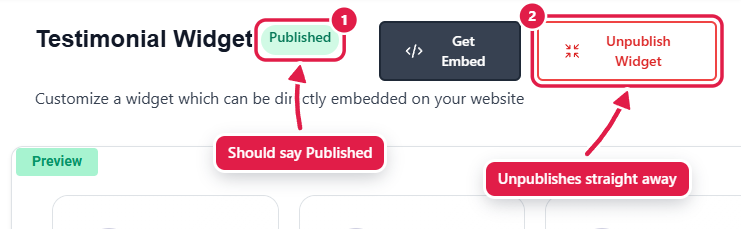
2. Look at the status next to the title. It should say **Published**.
3. If it says **Not yet published**, click **Publish Widget**.
The widget must show "Published" for it to appear on your website
The **Unpublish Widget** button takes effect immediately, without a confirmation, so it may have been clicked by accident. Also, if your paid plan ended or you moved to a smaller plan, some widgets may have been unpublished automatically. See [How many widgets can I publish on my plan?](/publishing-sharing-and-branding/plan-publish-limits.md)
## 2. The wall has no testimonials
The dashboard preview shows sample testimonials when your wall is empty, marked **Sample**. They never appear on your website. Add testimonials from **My Testimonials** or **Import Testimonials** first.
## 3. The wall URL changed
The embed code contains your wall URL. If the URL was changed in **Wall Settings**, the old code stops working. Copy the new code from **Get Embed** and replace the old one.
## 4. The code was pasted in the wrong place
* Paste the code into an **HTML**, **Embed** or **Custom code** block of your website builder, not into a normal text block. Text blocks show code as text or strip it out.
* Paste the whole code, including the `