> For the complete documentation index, see [llms.txt](https://docs.famewall.io/llms.txt). Markdown versions of documentation pages are available by appending `.md` to page URLs; this page is available as [Markdown](https://docs.famewall.io/testimonial-widget-settings/switch-widget-layout.md).
# How to switch your widget between Grid, Carousel and Dual Slider
Change your widget from a grid to a carousel or a dual slider. The layout is part of the embed code, so switching layouts means replacing the code on your website.
Famewall widgets come in three layouts: a grid, a carousel and a dual slider. The layout on your website is set by the embed code you paste, not by a setting saved in the dashboard. So if you change your mind after embedding, you need to paste the code for the new layout.
## Steps
1. Open your wall and click **Testimonial Widget**.
2. In the **Branding Customization** panel, pick a layout in **Widget Layout** to preview it.
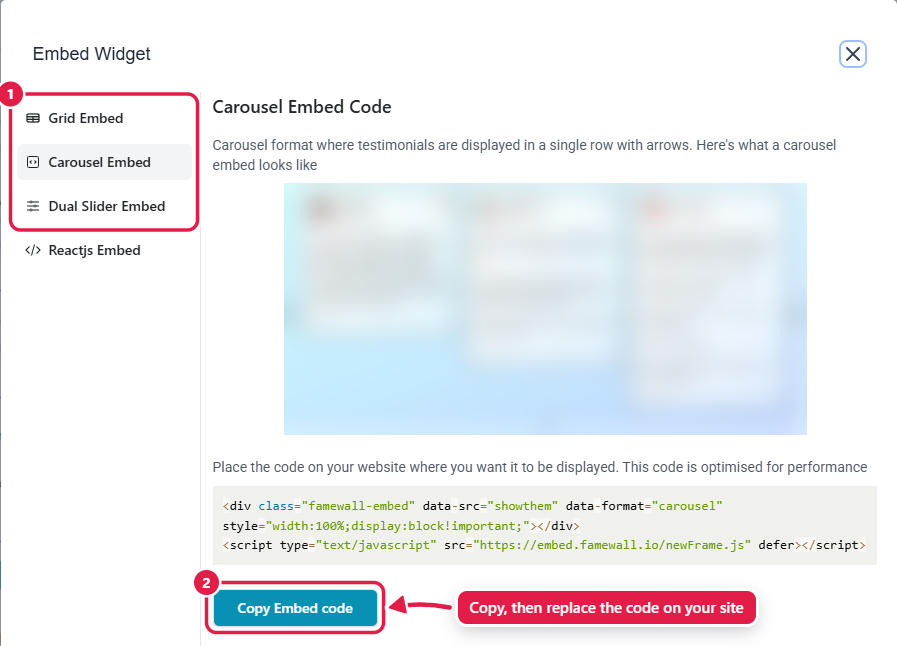
3. Get the code for that layout. If your widget is published, the **Embed Widget** window opens on the right tab as soon as you pick a layout. Otherwise, click **Get Embed** and choose **Grid Embed**, **Carousel Embed** or **Dual Slider Embed**.
4. Click **Copy Embed code**.
5. On your website, replace the old Famewall code with the new one.
Widget Layout changes the preview; the embed code sets the layout on your website
Each layout has its own embed code
{% hint style="warning" %}
Changing **Widget Layout** and saving doesn't change the widget already on your website. If your site still shows the old layout, you haven't replaced the embed code yet.
{% endhint %}
## How each layout behaves
| Layout | What visitors see |
| --------------- | ---------------------------------------------------------------------------------------------------------------------------------------------------------------------------------- |
| **Grid** | A masonry grid. The number of columns adapts to the space on your page: one column on phones, up to four on very wide pages. The only layout that supports a **Load More** button. |
| **Carousel** | Cards in a row with arrows and dots: up to three cards on wide pages, one on phones. Can [slide automatically](/testimonial-widget-settings/carousel-autoplay.md). |
| **Dual Slider** | Two rows of cards that scroll continuously in opposite directions and pause when a visitor hovers. The speed can't be changed. With three testimonials or fewer, it shows one row. |
## Good to know
* Everything else, like card design, colours and dark mode, updates on your website without a new code.
* When you pick **Carousel**, **Shorten Long Text Content** switches on automatically, so long testimonials don't make the carousel very tall. You can turn it off again.
* The **Carousel Height** setting only appears when **Carousel** is selected.
* If you use the Famewall plugin for WordPress or the Wix app, you pick the layout inside the plugin instead.
## Related
* [How to make your testimonial carousel slide automatically](/testimonial-widget-settings/carousel-autoplay.md)
* [Widget Types Showcase](/widget-types-showcase.md)
* [Embedding Testimonials to Websites](/embedding-testimonials-to-websites.md)