> For the complete documentation index, see [llms.txt](https://docs.famewall.io/llms.txt). Markdown versions of documentation pages are available by appending `.md` to page URLs; this page is available as [Markdown](https://docs.famewall.io/testimonial-widget-settings/popup-widget.md).
# How to show testimonials as a popup in the corner of your website
Show one testimonial at a time in a small popup in the corner of your website. Set it up with the Popup card design and the popup embed code.
The popup widget shows one testimonial at a time in a small card in the bottom corner of your website. It changes to the next testimonial every few seconds, and visitors can click it to read the full testimonial. It's a light way to add social proof to landing and checkout pages without taking up space.
## Step 1: Switch the widget to the popup design
1. Open your wall and click **Testimonial Widget**.
2. In the **Branding Customization** panel, click **Change** under **Card design**.
3. Pick **Popup Widget Testimonial**.
4. Click **Save Widget Changes**.
The popup is one of the card designs
## Step 2: Add the popup code to your website
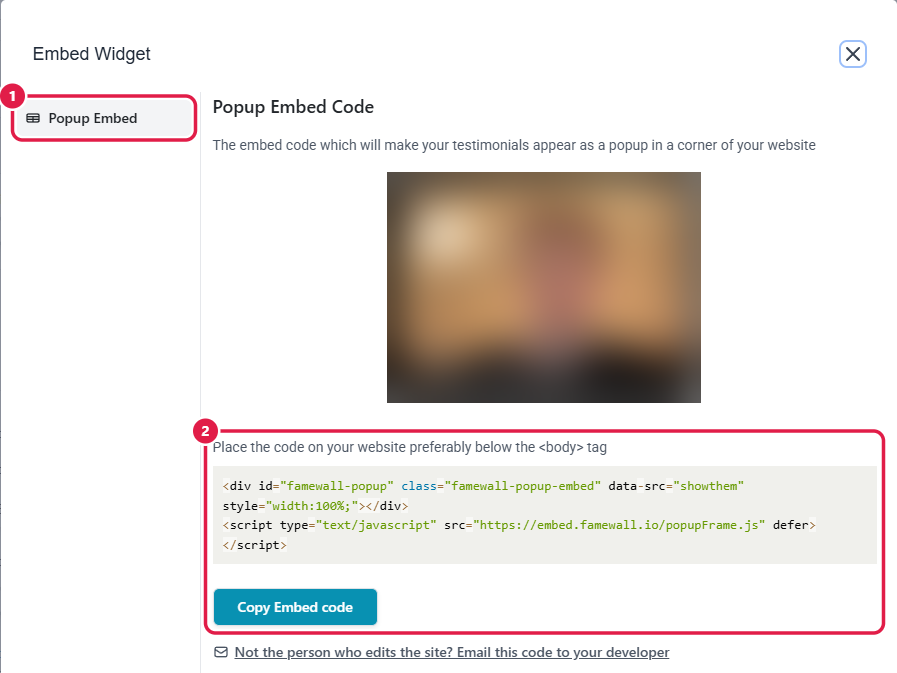
1. Click **Get Embed**. With the popup design selected, the window shows **Popup Embed**.
2. Click **Copy Embed code**.
3. Paste the code into your website, ideally just after the opening `` tag or in your site's footer code, so it loads on every page where you want the popup.
The popup has its own embed code
## How the popup behaves
* It sits 20 pixels from the bottom-left corner of the screen. You can move it to the bottom-right. See [How to change the popup's position and its "Visit Famewall" button](/testimonial-widget-settings/popup-position-and-button.md).
* It shows a new testimonial every 8 seconds, or 9 seconds for video testimonials.
* Clicking it opens a larger view with the full testimonial and a call-to-action button.
* It goes through all your testimonials. The review banner, AI summary and categories aren't shown in the popup.
## Good to know
* The popup needs its own code. The grid, carousel and slider codes don't show a popup, and the popup code doesn't show a grid.
* If you switch away from the popup design later, remove the popup code from your website and paste the code for your new layout.
## Related
* [How to change the popup's position and its "Visit Famewall" button](/testimonial-widget-settings/popup-position-and-button.md)
* [How to switch your widget between Grid, Carousel and Dual Slider](/testimonial-widget-settings/switch-widget-layout.md)