> For the complete documentation index, see [llms.txt](https://docs.famewall.io/llms.txt). Markdown versions of documentation pages are available by appending `.md` to page URLs; this page is available as [Markdown](https://docs.famewall.io/publishing-sharing-and-branding/remove-famewall-branding.md).
# How to remove "Made with Famewall" from your widget, Wall of Fame page and collection page
Hide the "Made with Famewall" badge from your testimonial widget, Wall of Fame page, collection page and other embeds. Branding is removed per page, not for the whole account.
On paid plans you can hide the small Famewall badge from everything you publish. There's no single account-wide switch: each widget, page and embed has its own setting, so turn it off everywhere you use Famewall.
{% hint style="info" %}
Removing Famewall branding needs a paid plan. On the Free plan these switches are greyed out with an **Upgrade Plan to remove branding** link.
{% endhint %}
## Testimonial widget
1. Open your wall and click **Testimonial Widget**.
2. Open the **Widget Settings** panel.
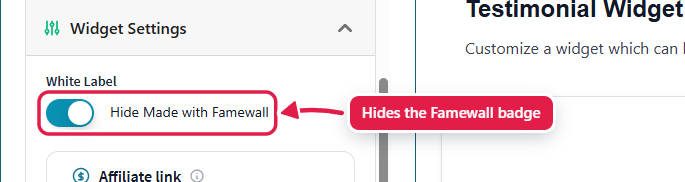
3. Under **White Label**, turn on **Hide Made with Famewall**.
4. Click **Save Widget Changes**.
Widget: Widget Settings → White Label
This removes the "Made with Famewall" line under grid, carousel and dual slider widgets.
## Wall of Fame page
1. Open your wall and click **Wall of Fame Page**.
2. Open the **Brand Customization & Settings** panel.
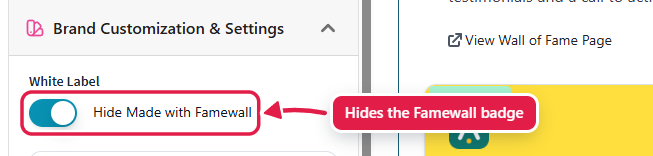
3. Under **White Label**, turn on **Hide Made with Famewall**.
4. Click **Save Wall of Fame Changes**.
Wall of Fame page: Brand Customization & Settings → White Label
## Collection page
1. Open your wall and click **Collection Page**.
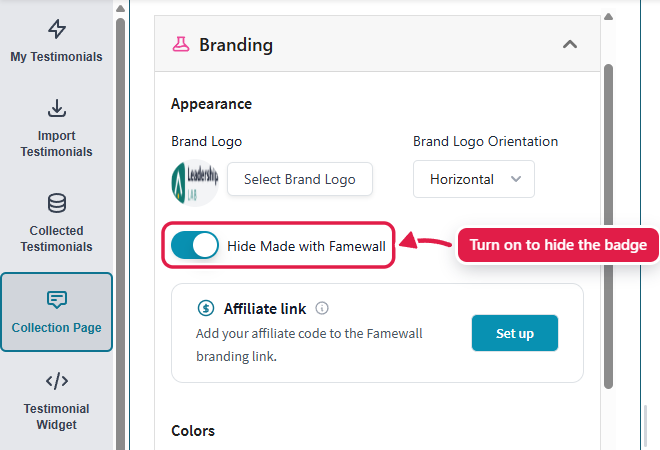
2. Open the **Branding** panel and turn on **Hide Made with Famewall**.
3. Click **Save Edit Changes**.
Collection page: Branding
This removes the badge from the collection page and from the thank-you popup.
## Other places with their own switch
| Where | Setting |
| ------------------------ | ----------------------------------------------------------------------------------------------------------------------------------------------------------------------------------- |
| Popup widget | The popup has no badge. Instead, its expanded view shows a "Visit Famewall" button, which you can change or hide in **Widget Settings** → **Popup Expanded Content Call To Action** |
| Brand Pages | **Hide Powered By Famewall** |
| Social Proof Avatars | **Hide "Made with Famewall"** |
| Logo Slider | **Hide Famewall Branding** |
| Testimonial Image Studio | Turn off **Enable Famewall Branding** |
| Social Sharing Video | **Hide Made with Famewall** |
## Good to know
* If your paid subscription ends, Famewall branding comes back on everything. If you subscribe again later, turn the switches back on yourself.
* On an agency account, putting your own logo on the Famewall dashboard is a separate setting in the Agency **Branding** tab.
* If you're a Famewall affiliate, you can keep the badge and add your affiliate code to it instead. See [How to add your affiliate code to the "Made with Famewall" link](/publishing-sharing-and-branding/affiliate-code-on-branding.md).
## Related
* [Testimonial Widget Customization](/testimonial-widget-customization.md)
* [Wall of Fame Page Customization](/wall-of-fame-page-customization.md)