> For the complete documentation index, see [llms.txt](https://docs.famewall.io/llms.txt). Markdown versions of documentation pages are available by appending `.md` to page URLs; this page is available as [Markdown](https://docs.famewall.io/publishing-sharing-and-branding/affiliate-code-on-branding.md).
# How to add your affiliate code to the "Made with Famewall" link
Famewall affiliates can add their affiliate code to the "Made with Famewall" link on their widgets and collection pages, so sign-ups from those links earn commission.
If you're part of the [Famewall affiliate program](/affiliate-program.md), you can turn the small "Made with Famewall" badge on your embeds into your referral link. Anyone who clicks it and signs up is tracked to your affiliate code.
## Steps
1. Open any wall and click **Testimonial Widget**.
2. Open the **Widget Settings** panel. Under **White Label**, click **Set up** on the **Affiliate link** card.
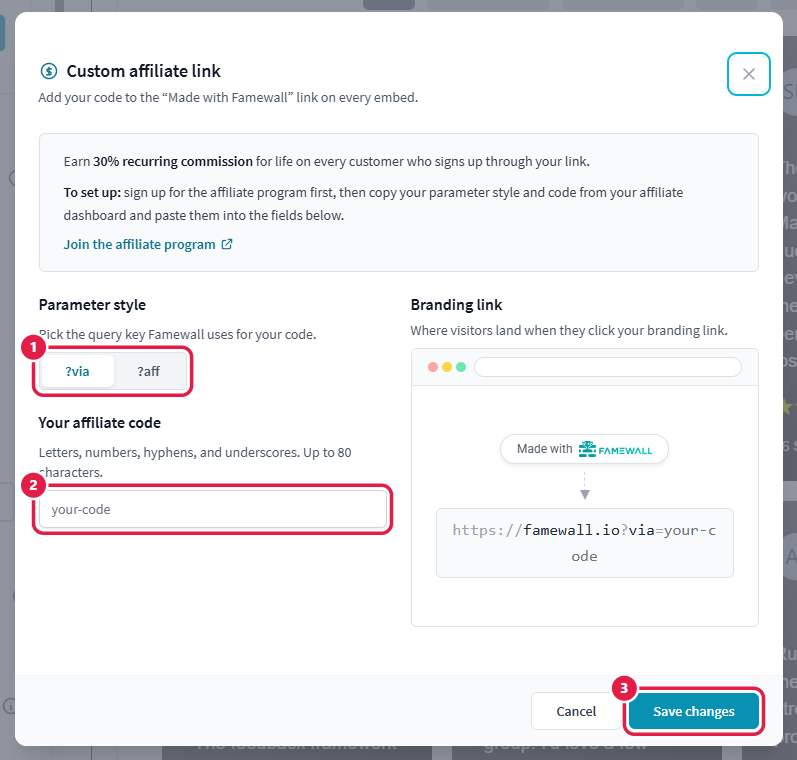
3. Choose the **Parameter style** your affiliate link uses: `?via` or `?aff`.
4. Enter **Your affiliate code**. Letters, numbers, hyphens and underscores are allowed, up to 80 characters.
5. Check the **Branding link** preview, then click **Save changes**.
Set up your affiliate code from the Affiliate link card
Pick the parameter style, enter your code and save
The code is saved straight away. You don't need to click **Save Widget Changes**.
## Where the code is used
Your code is added to the "Made with Famewall" link on your testimonial widgets and your collection pages. It's an account setting, so it applies to all your walls at once. You can also open the same **Affiliate link** card from a collection page's **Branding** panel.
## Good to know
* The badge has to be visible for the link to work. If you've turned on **Hide Made with Famewall**, there's no link to click. Famewall shows a note on the card when this is the case.
* The affiliate link needs a paid plan.
* To stop using it, open the card and remove the code.
* New to the program? Use **Join the affiliate program** inside the window, or see [Affiliate Program](/affiliate-program.md).
## Related
* [How to remove "Made with Famewall" from your widget, Wall of Fame page and collection page](/publishing-sharing-and-branding/remove-famewall-branding.md)