> For the complete documentation index, see [llms.txt](https://docs.famewall.io/llms.txt). Markdown versions of documentation pages are available by appending `.md` to page URLs; this page is available as [Markdown](https://docs.famewall.io/managing-testimonials/move-testimonials-to-the-top.md).
# How to move testimonials to the top of your wall (one or several)
Put your best testimonials first. Move one testimonial to the top of your wall with a single click, or move several at once in the order you choose.
The order of testimonials in **My Testimonials** is the order visitors see in your widget and on your Wall of Fame page. Moving your strongest testimonials to the top is the quickest way to make a good first impression.
## Move one testimonial to the top
1. Open your wall. **My Testimonials** opens by default.
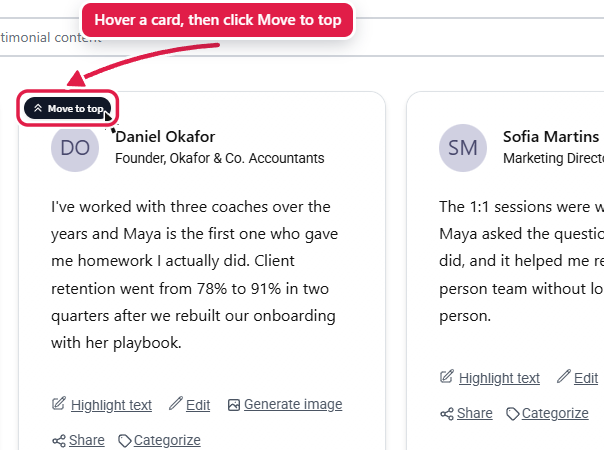
2. Hover over the testimonial. A **Move to top** button appears in its top-left corner.
3. Click **Move to top**.
Hover over a card to see "Move to top"
The change is saved straight away and shows in your widget within a few minutes.
## Move several testimonials to the top in a set order
1. In **My Testimonials**, click **Organize Testimonials** and choose **Select multiple testimonials**.
2. Click the testimonials in the order you want them to appear. Each one gets a number: 1 will be first, 2 second, and so on.
3. Click **Move to top** in the bar at the bottom of the screen.
The numbers show the order the testimonials will appear in
## Good to know
* You can also drag and drop any card to a new position.
* **Move to top**, drag and drop and **Select multiple testimonials** aren't available while a search or category filter is active. Clear the search box and click **Search** to get them back.
* On phones and tablets, where you can't hover, use **Select multiple testimonials** instead.
* There's no way to pin a testimonial. Testimonials you approve or import later are added at the top, above it.
## Related
* [Arrange and Reorder Testimonials](/arrange-and-reorder-testimonials.md)
* [How to sort your testimonials by date](/managing-testimonials/sort-testimonials-by-date.md)