> For the complete documentation index, see [llms.txt](https://docs.famewall.io/llms.txt). Markdown versions of documentation pages are available by appending `.md` to page URLs; this page is available as [Markdown](https://docs.famewall.io/collection-page-settings/thank-you-message-and-video.md).
# How to change the thank-you message and add a thank-you video
Change the title and message of the thank-you popup customers see after submitting, and add a short thank-you video from you.
After a customer submits a testimonial, your collection page shows a thank-you popup. You can write your own title and message, and on paid plans add a personal thank-you video.
## Change the thank-you title and message
1. Open your wall and click **Collection Page** in the left menu.
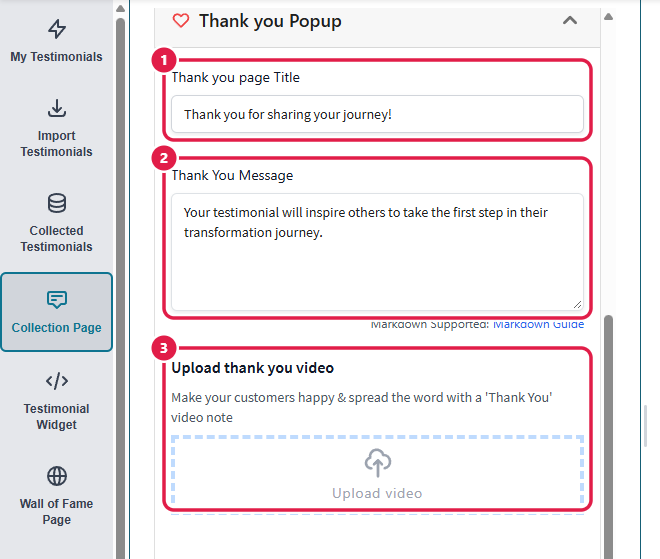
2. Open the **Thank you Popup** panel.
3. Edit the **Thank you page Title** and the **Thank You Message**. The message supports Markdown, so you can add links or bold text.
4. Click **Save Edit Changes**.
The Thank you Popup panel
The popup customers see after submitting
## Add a thank-you video
1. In the same **Thank you Popup** panel, click **Upload thank you video** and choose a video file.
2. Click **Save Edit Changes**.
3. Keep the tab open until the upload finishes. Famewall shows a message while the video uploads.
The video plays inside the thank-you popup. Keep it short; a few seconds of a genuine "thank you" works better than a long clip. Thank-you videos need a paid plan.
## Good to know
* The title can't be empty. The message can be changed but not removed, because an empty message isn't saved.
* After a written, image or audio testimonial, customers also see a short confirmation message that says the team will review their testimonial. That message is the same on every collection page and can't be changed.
* The thank-you popup shows "Made with Famewall" unless you hide it. See [How to remove "Made with Famewall"](/publishing-sharing-and-branding/remove-famewall-branding.md).
* If you're setting up a brand new collection page, create it first, then add the video and save again.
## Related
* [How to send customers to your website after they submit a testimonial](/collection-page-settings/redirect-after-submission.md)
* [How to add a personal welcome video to your collection page](/collection-page-settings/personal-welcome-video.md)