> For the complete documentation index, see [llms.txt](https://docs.famewall.io/llms.txt). Markdown versions of documentation pages are available by appending `.md` to page URLs; this page is available as [Markdown](https://docs.famewall.io/collection-page-settings/marketing-consent-checkbox.md).
# How to ask customers for marketing consent on your collection page
Get customers' permission to use their testimonial in your marketing, either as a checkbox they can untick or as a line of small print above the submit button.
If you need clear permission before using a testimonial in ads, emails or on your website, add a marketing consent line to your collection page form.
## Steps
1. Open your wall and click **Collection Page** in the left menu.
2. Open the **Fields Collection Page** panel and scroll to **Marketing Consent**.
3. Turn on **Ask for Marketing Consent**.
4. Pick a **Consent Style**:
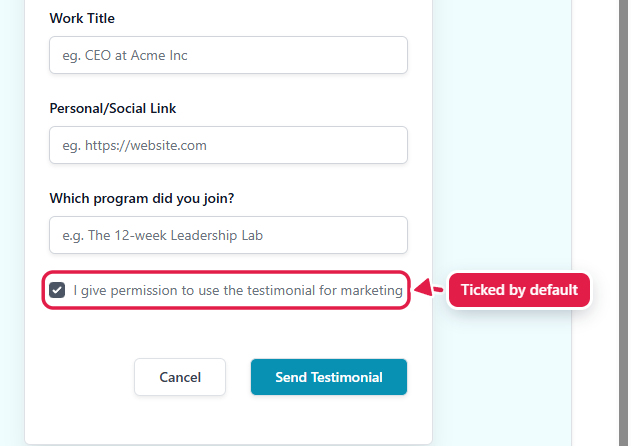
* **Checkbox** shows a ticked checkbox next to your consent message. Customers can untick it before they submit.
* **Mandatory** shows your consent message as small print under the submit button. Submitting the testimonial counts as consent.
5. Edit the **Consent Message** if you want different wording. You can use Markdown, for example to link to your privacy policy.
6. Click **Save Edit Changes**.
Marketing consent settings in the Fields Collection Page panel
With the Checkbox style, customers can untick the box before submitting
The consent line appears on the form for every testimonial type: text, video, audio and image.
## Where to see a customer's answer
With the **Checkbox** style, each collected testimonial is marked **Consent given** or **Consent not given** in **Collected Testimonials**, so you know which ones you can use in your marketing.
## Good to know
* The checkbox starts ticked. Customers who don't want their testimonial used in marketing need to untick it.
* Switching the **Consent Style** replaces your message with the default text for that style, so edit the message after choosing the style.
* The **Consent Message** can't be left empty. If it is, your changes won't save.
## Related
* [How to choose which details customers fill in (email, job title, rating, photo, website)](/collection-page-settings/choose-form-fields.md)
* [Markdown Guide](/markdown-guide.md)