> For the complete documentation index, see [llms.txt](https://docs.famewall.io/llms.txt). Markdown versions of documentation pages are available by appending `.md` to page URLs; this page is available as [Markdown](https://docs.famewall.io/collection-page-settings/industry-templates.md).
# How to set up your collection page in one click with an industry template
Pre-fill your collection page with questions, wording and colours written for your type of business: coaches, course creators, agencies, SaaS, e-commerce and more.
Writing good questions takes time. Templates fill in your collection page with questions and wording that fit your kind of business, so you only need to tweak them.
## Steps
1. Open your wall and click **Collection Page** in the left menu.
2. Open the **Templates** panel and click **Choose from Template**.
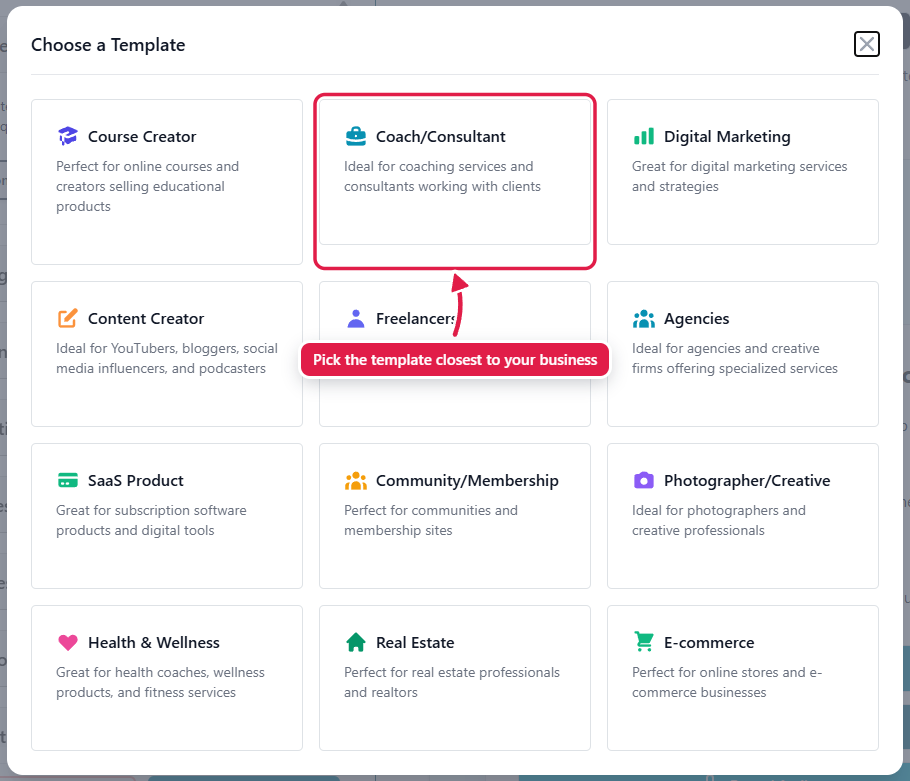
3. Pick the template closest to your business.
4. Click **Yes, overwrite** to confirm.
5. Review the text in each panel, change anything you like, and click **Save Edit Changes**.
There are twelve templates to choose from
Applying a template replaces your current wording, so you're asked to confirm
## Available templates
Course Creator, Coach/Consultant, Digital Marketing, Content Creator, Freelancers, Agencies, SaaS Product, Community/Membership, Photographer/Creative, Health & Wellness, Real Estate and E-commerce.
## What a template changes
A template replaces:
* The page title and your message to customers.
* The questions and titles for text, video and audio testimonials, including the AI Composer questions.
* The details form title, and the thank-you title and message.
* Your button and background colours.
A template doesn't change your logo, which testimonial types are switched on, the fields you ask for, the discount scratch card or the Twitter settings.
## Good to know
* Nothing goes live until you click **Save Edit Changes**. If you don't like the result, leave the page without saving.
* Applying a template overwrites any wording you've written yourself. Copy anything you want to keep before you apply it.
* You can apply a different template at any time.
## Related
* [How to add your logo and brand colours to your collection page](/collection-page-settings/logo-and-brand-colours.md)
* [How to change the question and hint text above the written testimonial box](/collection-page-settings/text-testimonial-question.md)