> For the complete documentation index, see [llms.txt](https://docs.famewall.io/llms.txt). Markdown versions of documentation pages are available by appending `.md` to page URLs; this page is available as [Markdown](https://docs.famewall.io/collection-page-settings/accept-image-testimonials.md).
# How to let customers upload an image or screenshot as a testimonial
Let customers send a screenshot or photo as their testimonial, for example a review they posted elsewhere or a message they sent you.
Some customers have already said something nice about you in an email, a chat or a post. Image testimonials let them send that screenshot straight from your collection page, with an optional caption. The option is switched off on new collection pages, so you need to turn it on.
## Steps
1. Open your wall and click **Collection Page** in the left menu.
2. Open the **Testimonial Home Page & Configuration** panel and scroll to **Testimonial types**.
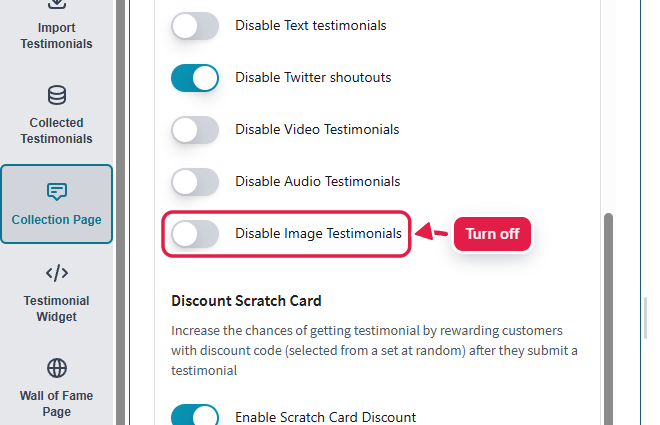
3. Turn **off** the **Disable Image Testimonials** switch.
4. Click **Save Edit Changes**.
Turn off "Disable Image Testimonials"
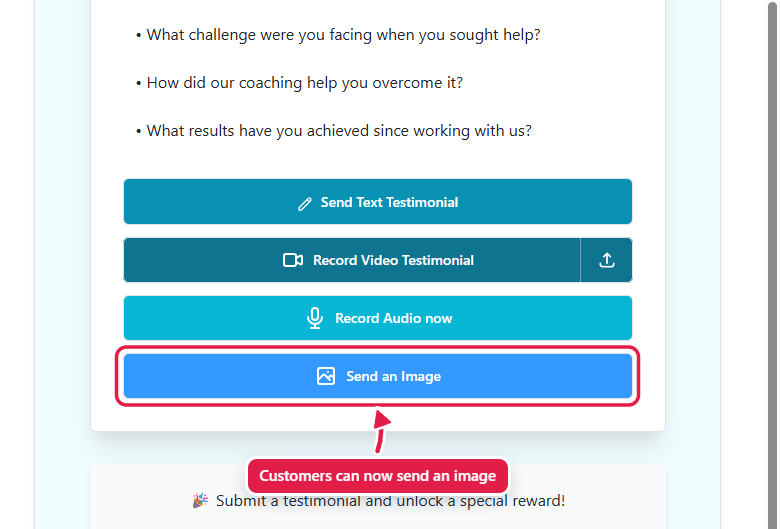
A "Send an Image" button appears on your page
Your collection page now shows a **Send an Image** button. Customers click it, upload a PNG, JPG or GIF of up to 10 MB, add a caption if they like, and then fill in their name and other details. The testimonial arrives in **Collected Testimonials** like any other submission.
## Customize the button and labels
* Change the button colour in **Branding** → **Image Button Color**. This colour option only appears once image testimonials are switched on.
* Change the button text in **Fields & Button Text Customization** → **"Send an Image" Button Text**.
* Change the upload labels in **Fields & Button Text Customization** → **Image Based Testimonial Page**.
## Good to know
* Image testimonials work when customers open your collection page link. They aren't available inside the collection page embed on your own website, so share the link if you want image submissions.
* The **Page Title** from the **Text Testimonial Page** panel is also used as the title of the image upload window.
## Related
* [How to turn off text, video or audio testimonials on your collection page](/collection-page-settings/turn-off-text-video-or-audio-testimonials.md)
* [Approving a collected testimonial](/approving-a-collected-testimonial.md)